Audio Line TesterLineTest.zip, Version 2.0, Size: 47,796 bytes. CRC32/MD5 codes: 222A1BC0/E248D9A200A3167E534345F8160DADDD LineTest is a small audio subsystem tester for Windows computers. It runs on all 32 bit Windows, and probably on WINE in Linux. It has been tested and works well on 64-bit Windows 7 and Windows 10. Context for use: LineTest was built to test audio for the BlueStar synthesiser. Version 2 adds ASIO and a new control system used in most of my later work. Unzip LineTest.exe (and the DLL file) to wherever you want it, and run it. If it is missing its config file, it will make one with default data. More than one copy of LineTest can be run at the same time from its own base directory and config file, within limits imposed by whatever you connect it to. This HTML page is the manual, so keep a copy of it. Audio setup: Start with the defaults in the config file that is created when the program first runs, 16-bit audio at 44.1 KHz, and no ASIO. Use the program's control panel to set audio input and output ports, or to enable a sinewave generator when no input is to be used. Results will depend on the quality of the hardware and the driver code supplied for it, and this is the context it is intended to test. If this works well, many other things will too.
With Steinberg's ASIO, excellent performance is possible with USB2 audio hardware. Some low-cost devices were found to be ideal: Focusrite 2i4, Steinberg UR22 MkI and MkII, M-Audio M-Track Quad, and M-Audio M-Track Duo (but you'll need to get MIDI connections some other way if you use that last one). It will be clear by now that ASIO is for much more demanding purposes than a line tester, but having a fast and simple way to test ASIO is always good... Editor controls: People who need an audio tester probably know enough about audio not to need me to spell it out, but I'll describe the controls, and the config settings that aren't accessed directly by the controls. 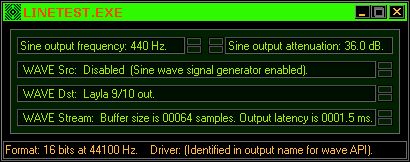 The internal sine wave generator is set by the first two controls, and enabled by the third when an external input is not being used. It defaults to standard concert pitch at 440 Hz, and a low amplitude of 48dB below full scale, to prevent nasty (and potentially dangerous) surprises when switching it on when an amplifier is set loud. The signal generator controls have a smooth operation like potentiometers, and double-clicking the small pads will reset them to default values. Mouse control by click-and-drag upwards or downwards will sweep the value through a large range, and because the tuning range is VERY large, accelerated response can be had by holding a Ctrl key while you adjust it, and you can also directly enter a value in Hz as text, by first double-clicking the existing text and typing the replacement data, then pressing Enter. The up/down arrow keys can also be used for adjustment of any control. The source and destination controls are self-explanatory. If you can select it, you can use it. What you see depends entirely on the hardware and driver support in your system. When set to ASIO, the signal controls replace 'WAVE' with 'ASIO', and channel names may change, based on how the ASIO driver names them. The last control sets the size of two buffers each for input and output, used to transfer sound from source to destination. The scaling is a halving or doubling of sample count (default is 1024), directly proportional to time taken, so the stream can also be described in terms of output latency, the delay between digital signal creation and its arrival at the analog output system. That latency is important. It must be low, for good performance. This tester breaks wide open a myth that has prevailed in electronic music 'wisdom' for decades! That is a WAVE system, literally the WAVE API, a subsystem that to this day most people insist is useless for high performance, citing delays as great as 700ms! They ARE right, that such delays are useless for high performance, but they are WRONG in insisting that the WAVE API enforces such poor performance. Real performance is based on real hardware, real device drivers. This is a major purpose of this tester, to help quantify just what you can get if you use the right stuff. In this case, LineTest is running on Windows 98, sending its signal through an Echo Audio device called Layla, the original 20-bit multichannel I/O rack device that uses a PCI card for digital signaling. Anyone who knows computer music systems knows that 1.5ms output latency is EXTREMELY good, there are systems using ASIO that can't go that low. As it is, in the same context (W98, Echo Layla, but with ASIO), the latency can be reduced to 0.7ms, and with the USB devices mentioned earlier, running on Windows 7, latency can be as low as 0.2ms, an interval that no human senses can detect as a delay. To enable ASIO, open the config file in a text editor when LineTest IS NOT running, and change the "Use_ASIO" value from 0 to 1 (or to another non-zero value if you know what you have and why you need to do so). If you set it too high, it will 'wrap round' and find the first ASIO driver your system can offer it, or it reverts to 0 if run in a system where ASIO is not available to it. This is an easy 'set and forget' method on any system that remains stable, but to avoid annoyance, make sure your ASIO device(s) are plugged in and ready before running LineTest! The same applies to any context, so this is a reasonable expectation of whoever sets up the system. Likewise, "Audio_24" can be changed from 0 to 1, enabling 24 bit audio. This is a tester for high grade audio systems. External sources can be input to allow use of an oscilloscope, distortion meter, or spectrum analyser, to gauge the quality of the entire system, but the internal sinewave generator is good enough for detailed tests of output quality, which is enough for any system that makes digital signals. "Sample/s" can be set as needed. ASIO usually allows a limited number of settings, and setting something different may cause a shift in signal frequency, so stay with 44100 or 48000 settings for ASIO unless you know your devices offer more. Echo's Layla, when using WAVE output, is interesting because it allows sample rates from 8000Hz to 50000Hz in 1Hz steps! The Layla24 device extends from 2000Hz to 100000Hz in 1Hz steps! I mention this because these devices can be used for laser galvanometer control, and the later device makes bypassing of 10µF capacitors particularly easy, so links can be soldered in their place to enable full DC-coupled output. This allows excellent laser scan systems to be built a lot more cheaply than is usual, and this applies to self-built lab gear too. LineTest may become indispensable in maintaining the quality of connections in any of these systems, |
